Agent Access Control — Who Can See and Chat with Each Agent
Access: Tenant Admins only
By default, a newly registered agent is not visible to any users until they are explicitly assigned. Agent Access Control is where you grant specific users access to each agent.
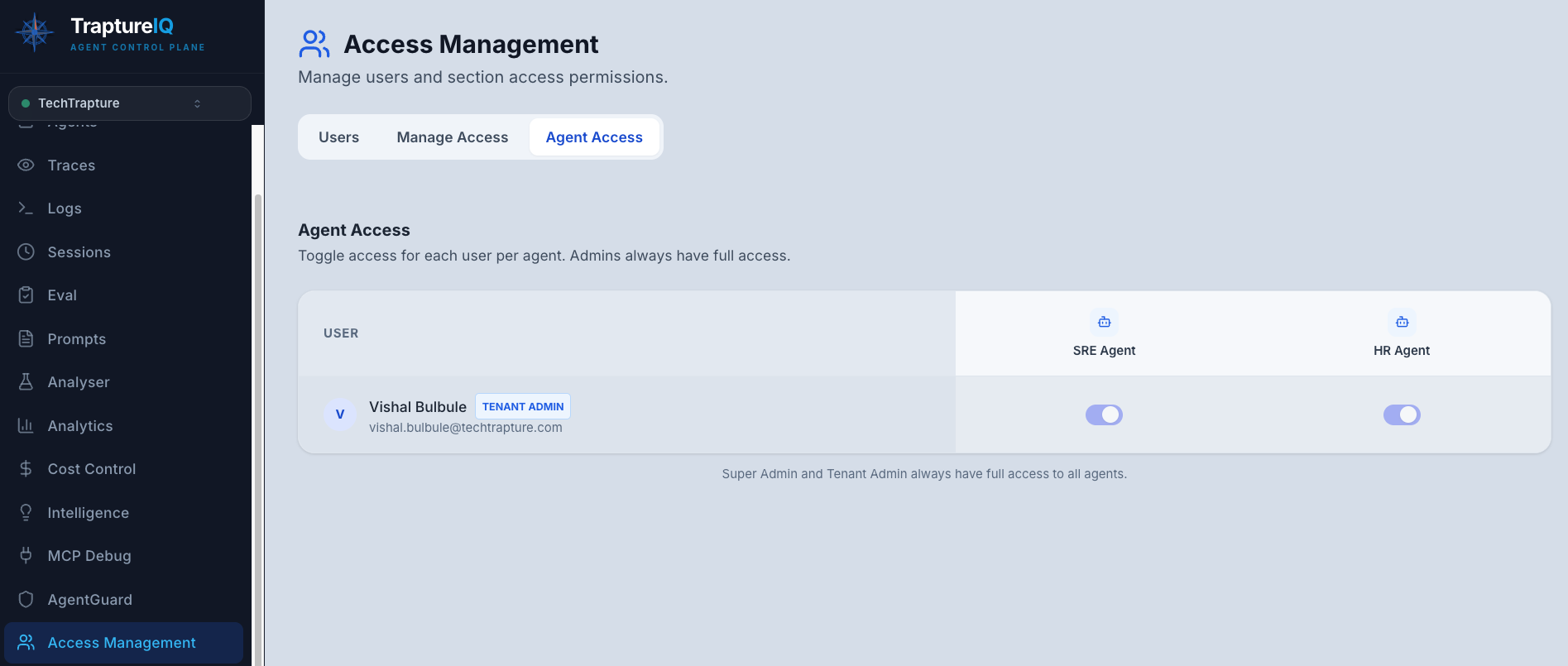
What is Agent Access Control?
Think of it as a per-user, per-agent permission switch. For every user in your workspace, you can toggle access to each agent individually. If access is off, the agent is completely hidden from that user — they can't see it, can't find it, and can't chat with it.
Why it matters:
- Different teams may need access to different agents
- Some agents handle sensitive data and should only be available to authorized users
- Beta or experimental agents should be limited to testers
- Contractors or external users should only see agents relevant to their work
How to Configure Agent Access
Step 1: Open Agent Access Management
- Click Access Management in the sidebar.
- Navigate to the Agent Access tab.
Step 2: View the Access Matrix
You'll see a matrix showing:
- Rows — All users in your workspace
- Columns — All registered agents
- Toggles — On/Off switches at each intersection
Step 3: Toggle Access
- Toggle ON — The user can see the agent in their Agents page, start chats, and view sessions
- Toggle OFF — The agent is completely hidden from this user
Changes take effect immediately — no separate save button needed.
How Agent Access Works
| Setting | What the User Experiences |
|---|---|
| Access ON | The agent appears in their Agents page, they can start chats, and they can see sessions for that agent |
| Access OFF | The agent is completely invisible — it doesn't appear in their agent list, chat sidebar, or anywhere else |
Important Rules
- Tenant Admins always have access to all agents, regardless of these settings. Access control only affects Tenant Users.
- New agents are not visible to anyone until explicitly assigned — there is no automatic default access for regular users.
- Two-level requirement — For a user to access an agent, they need BOTH:
- The Agents section enabled via Section-Level Access
- Agent-level access assigned for that specific agent
- Agent access is separate from section access — a user could have the Agents section enabled but still not see certain agents if they haven't been assigned to those agents.
- This feature requires an active subscription.
Common Scenarios
| Scenario | Configuration |
|---|---|
| "Give everyone access to the general support bot" | Assign all users to that agent |
| "Limit the financial bot to the finance team only" | Assign only finance team members; don't assign anyone else |
| "Let beta testers access the new experimental agent" | Assign testers only |
| "Give a contractor access to just one agent" | Assign only that one agent to the contractor |
Tips for Beginners
- New agents default to hidden — When you register a new agent, no users can see it until you assign them. Remember to grant access after registration.
- Bulk management — The matrix view makes it easy to see and manage access across all users and agents at once.
- Combine with Section Access — Section Access controls which sidebar modules a user can see. Agent Access controls which agents within the Agents module they can interact with. Use both for fine-grained control.