Agent Firewall — Custom Security Rules
Access: Tenant Admins only
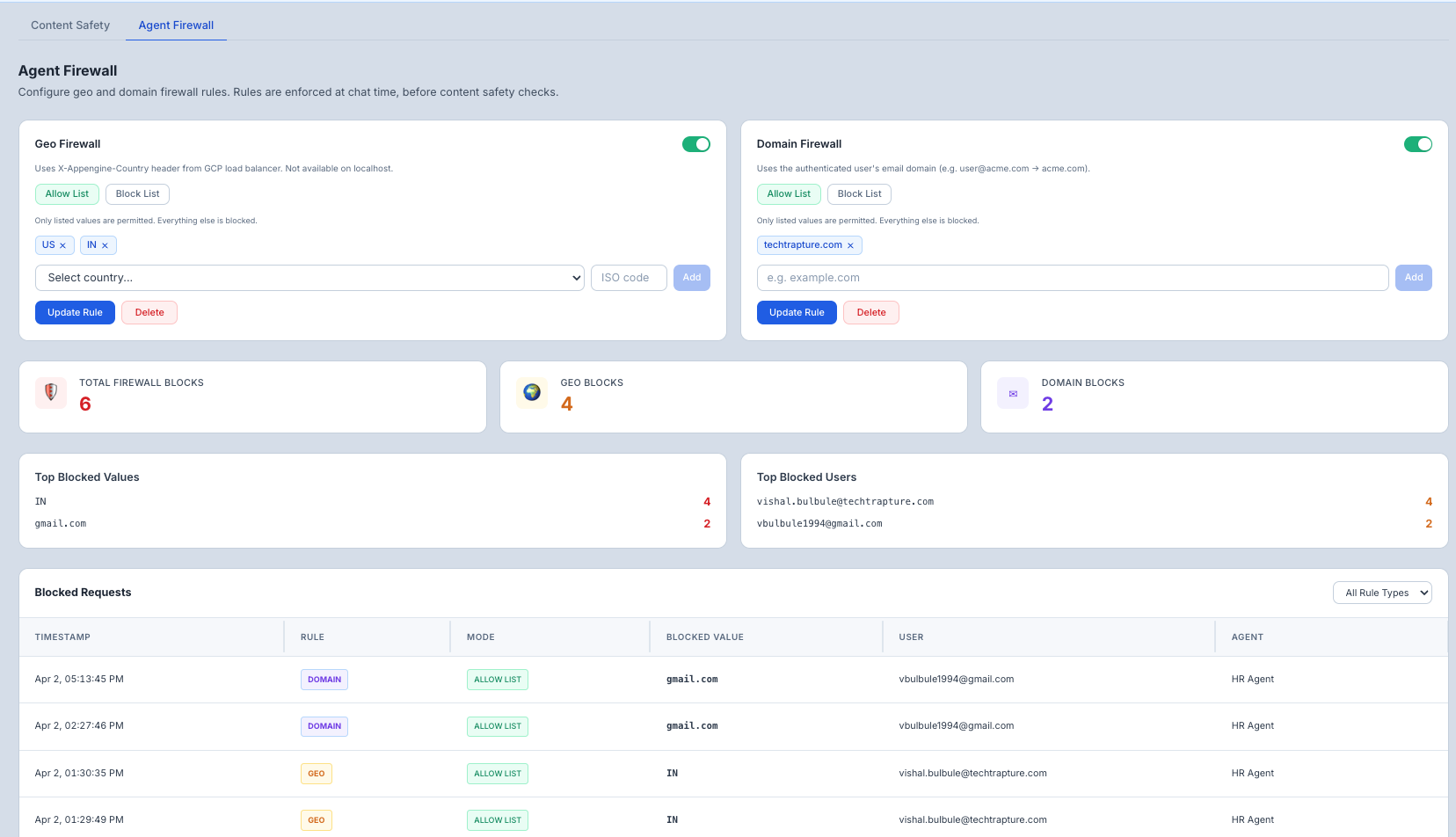
The Agent Firewall lets you create custom rules that proactively block traffic before it reaches your agent — based on where the user is connecting from (country) or which organization they belong to (email domain).
What is the Agent Firewall?
The firewall enforces access control policies in real-time for every message. You define who can (or cannot) access your agents based on geography or email domain.
Two rule types are available:
| Rule Type | What It Controls |
|---|---|
| Geo Firewall | Which countries can access your agents |
| Domain Firewall | Which organizations (email domains) can access your agents |
Each rule type supports two modes:
| Mode | Behavior |
|---|---|
| Allow List | Only listed values are permitted — everything else is blocked |
| Block List | Listed values are blocked — everything else is permitted |
Geo Firewall
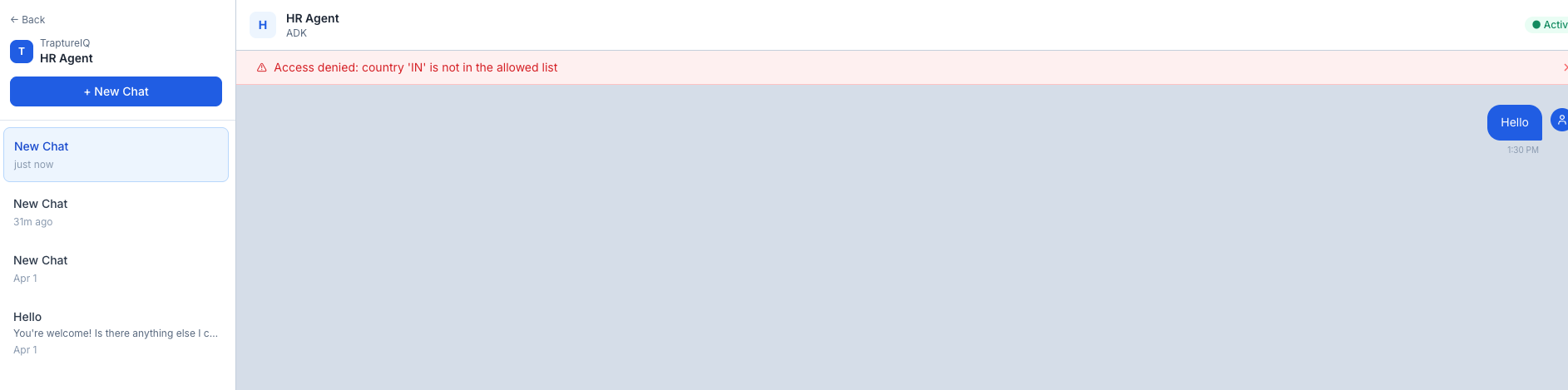
Controls agent access based on the user's country, detected automatically from their connection.
How it works
- Country codes are ISO 3166-1 alpha-2 format (e.g.,
US,IN,GB). - On localhost — the header is not present, so geo rules are skipped (fail-open). This only affects local development.
Configuring the Geo Firewall
- Go to AgentGuard → Agent Firewall.
- In the Geo Firewall card, choose your mode:
- Allow List — only users from listed countries can access agents
- Block List — users from listed countries are denied access
- Select a country from the dropdown or type a 2-letter ISO code directly (e.g.,
US,IN,SG). - Click Add — the country appears as a tag.
- Click Save to apply.
Removing a country
Click the × on any country tag, then click Save.
Deleting the rule entirely
Click Delete to remove the geo rule completely (all countries will be allowed).
Domain Firewall
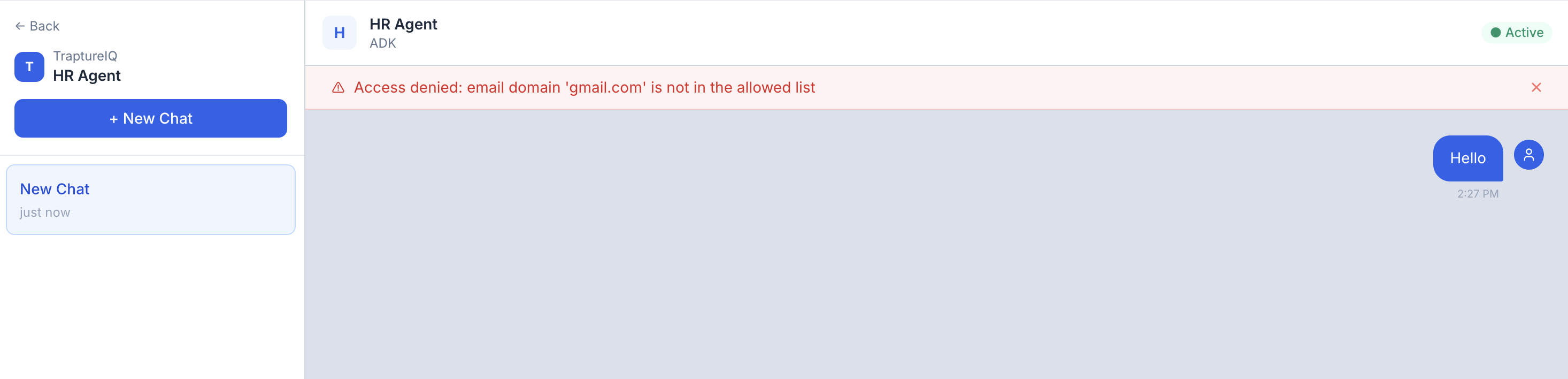
Controls agent access based on the authenticated user's email domain.
How it works
- Domain is extracted from the user's email address as verified by Firebase Auth (e.g.,
user@acme.com→acme.com). - This is tied to authenticated identity — it cannot be spoofed by the user.
Configuring the Domain Firewall
- Go to AgentGuard → Agent Firewall.
- In the Domain Firewall card, choose your mode:
- Allow List — only users with listed email domains can access agents
- Block List — users with listed email domains are denied access
- Type a domain in the input field (e.g.,
acme.com,evil.org). - Click Add — the domain appears as a tag.
- Click Save to apply.
Removing a domain
Click the × on any domain tag, then click Save.
Deleting the rule entirely
Click Delete to remove the domain rule completely.
Common Use Cases
| Scenario | Rule to Configure |
|---|---|
| "Only employees at our company can use agents" | Domain Firewall → Allow List → add your company domain (e.g., mycompany.com) |
| "Block a specific competitor or known-bad organization" | Domain Firewall → Block List → add their domain |
| "Restrict agents to users in our operating countries" | Geo Firewall → Allow List → add your country codes |
| "Block access from specific high-risk regions" | Geo Firewall → Block List → add those country codes |
| "Internal tool — only accessible within our country" | Geo Firewall → Allow List → add a single country code |
Firewall Block Events
Every request blocked by the firewall is recorded as a Firewall Block Event. These events are stored per tenant and are queryable via the API.
What's tracked per event
| Field | Description |
|---|---|
| timestamp | When the block occurred (UTC) |
| user_email | Email of the authenticated user who was blocked |
| rule_type | Which rule triggered the block — geo or domain |
| rule_mode | Whether it was an ALLOW_LIST or BLOCK_LIST match |
| blocked_value | The exact value that triggered the block (e.g. CN, evil.org) |
| country | Automatically detected country code — always captured when available |
| agent_id | Which agent the user was trying to access |
| reason | Human-readable explanation (e.g. Access denied: country 'CN' is blocked) |
API endpoints
| Endpoint | Description |
|---|---|
GET /tenants/{id}/firewall/events | Paginated list of block events with optional filters |
GET /tenants/{id}/firewall/stats | Aggregated stats: total blocks, by rule type, top blocked values and users |
Available filters on /events:
rule_type—geoordomainuser_email— filter by a specific userdays— look-back window (default: 30, use 0 for all time)start_date/end_date— explicit date rangelimit/offset— pagination
Available filters on /stats:
days,start_date,end_date— same date range controlstop_n— how many top entries to return per category (default: 10)
Tips
- Allow List is stricter than Block List — use Allow List when you know exactly who should have access. Use Block List when you only want to exclude specific parties.
- You can have both rules active at once — Geo and Domain rules are independent. A user must pass both checks to reach the agent.
- Use ISO 2-letter country codes —
USnotUnited States,INnotIndia. The UI includes a dropdown of common countries to help. - Domain rules require authenticated users — anonymous or unauthenticated requests are blocked before domain rules are evaluated.
- Geo rules are skipped on localhost — this is by design so developers can test locally without being blocked.
- Block events are audit-grade — every blocked request is persisted, so you can investigate suspicious access patterns after the fact.