Analytics Dashboard — Usage, Performance & Errors
Access: Tenant Admins only
The Analytics dashboard gives you a complete picture of how your agents are being used, how they're performing, and where errors are happening — all in one scrollable page.
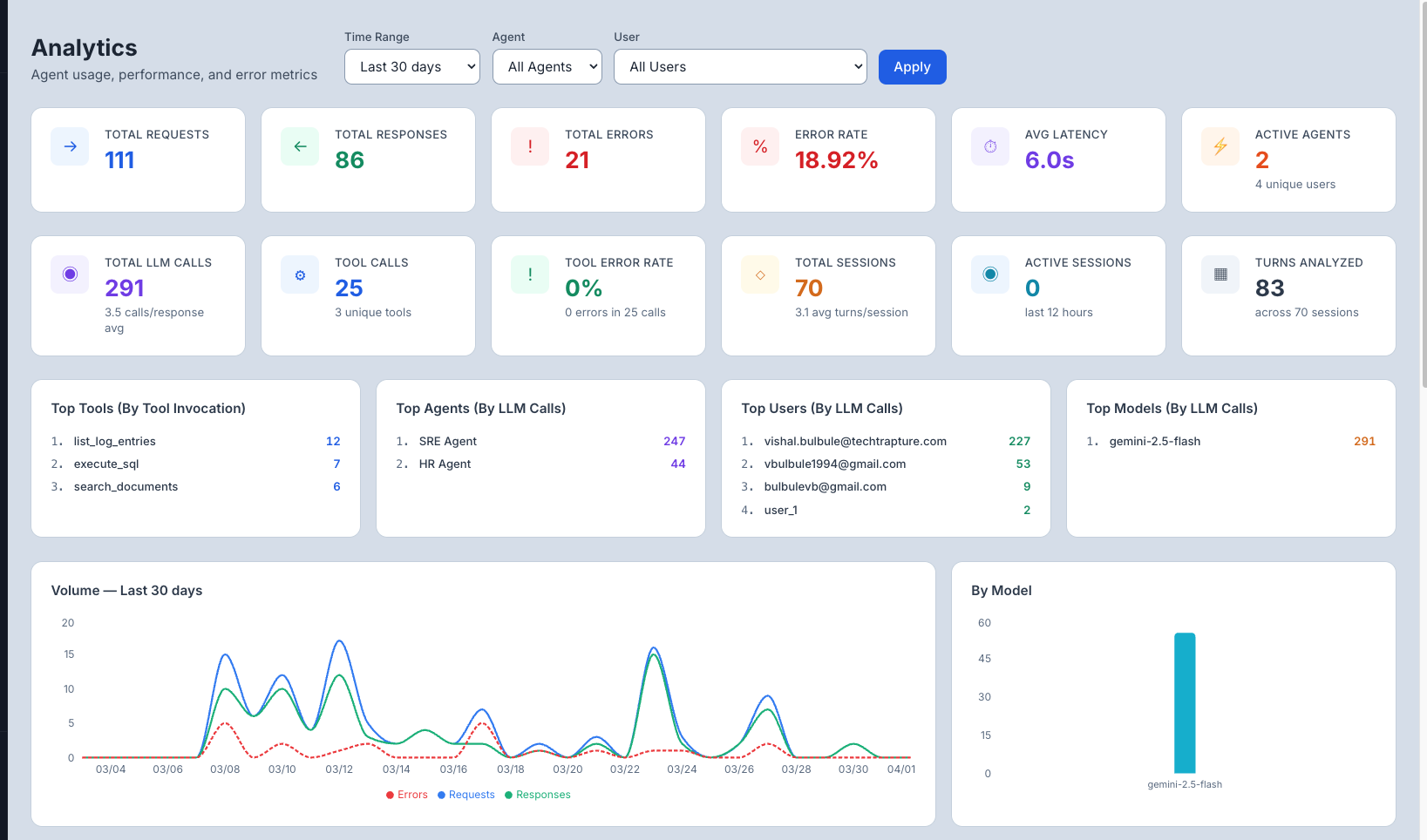
Filters
At the top of the page, three filters control every metric and chart below:
| Filter | What It Does |
|---|---|
| Time Range | Last 7 days, Last 30 days, Last 90 days, or All Time |
| Agent | Scope all metrics to a specific agent, or leave as All Agents |
| User | Scope all metrics to a specific user, or leave as All Users |
Click Apply after changing filters.
Summary Metrics
Two rows of stat cards give you an at-a-glance health check.
Row 1 — Request & Error Health
| Metric | What It Shows |
|---|---|
| Total Requests | All messages sent to agents in the selected period |
| Total Responses | Successful responses returned (Requests − Errors) |
| Total Errors | Count of failed requests |
| Error Rate | Errors as a % of total requests — target: under 5% |
| Avg Latency | Mean response time across all requests |
| Active Agents | Agents that received at least one request, plus unique user count |
Row 2 — LLM & Session Activity
| Metric | What It Shows |
|---|---|
| Total LLM Calls | Total calls made to the LLM (includes multi-step reasoning) |
| Tool Calls | How many times agents invoked external tools |
| Tool Error Rate | Percentage of tool calls that failed |
| Total Sessions | Unique conversation sessions started |
| Active Sessions | Sessions with activity in the last 12 hours |
| Turns Analyzed | Total message turns across all sessions |
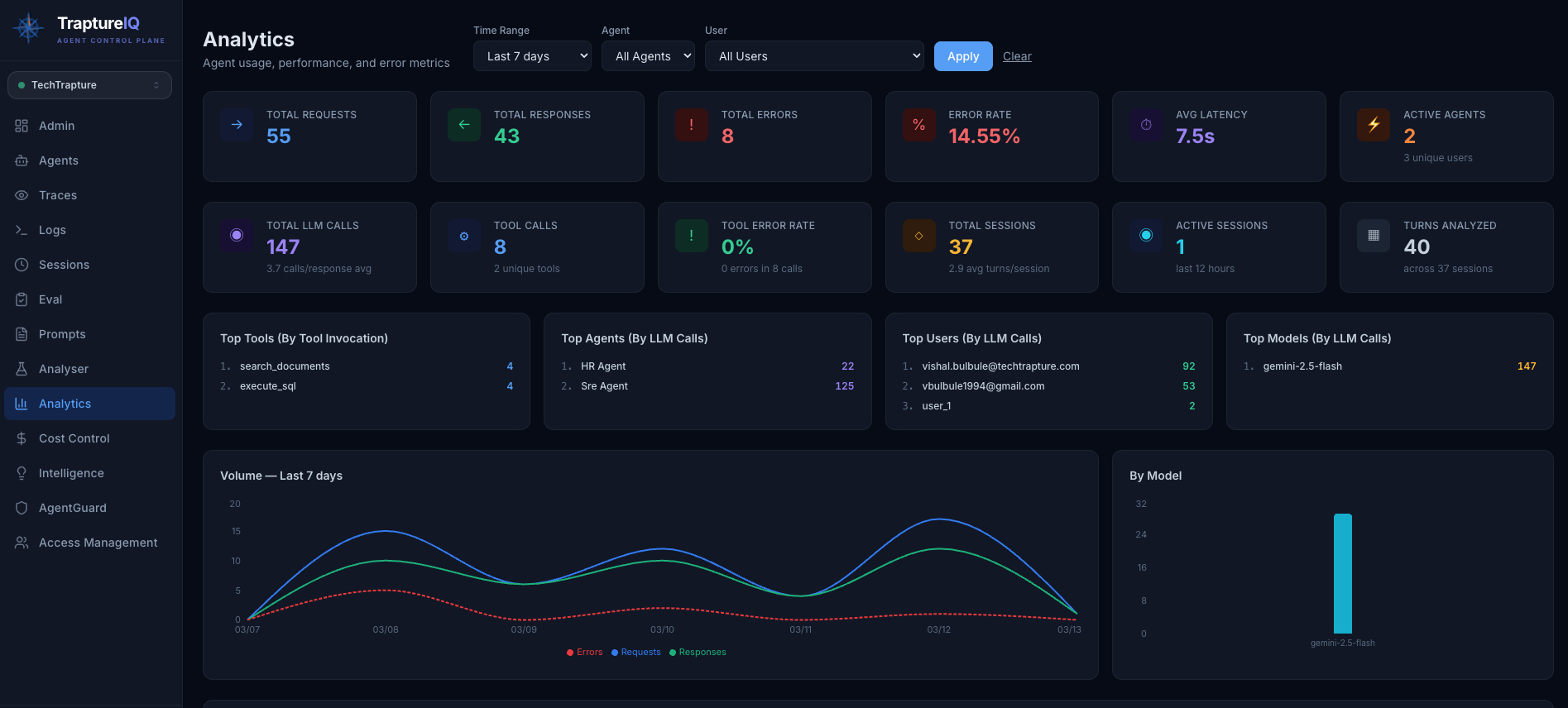
Top Lists
Four ranked panels show the most active items in the selected period:
| Panel | Ranked By |
|---|---|
| Top Tools | Tool invocation count |
| Top Agents | LLM call count |
| Top Users | LLM call count |
| Top Models | LLM call count |
Charts
Volume — Last N days (Line Chart) Overlays Requests, Responses, and Errors over time. Useful for spotting spikes, drops, or growing error trends.
By Model (Bar Chart) Shows LLM call distribution across models — helpful when agents use different models.
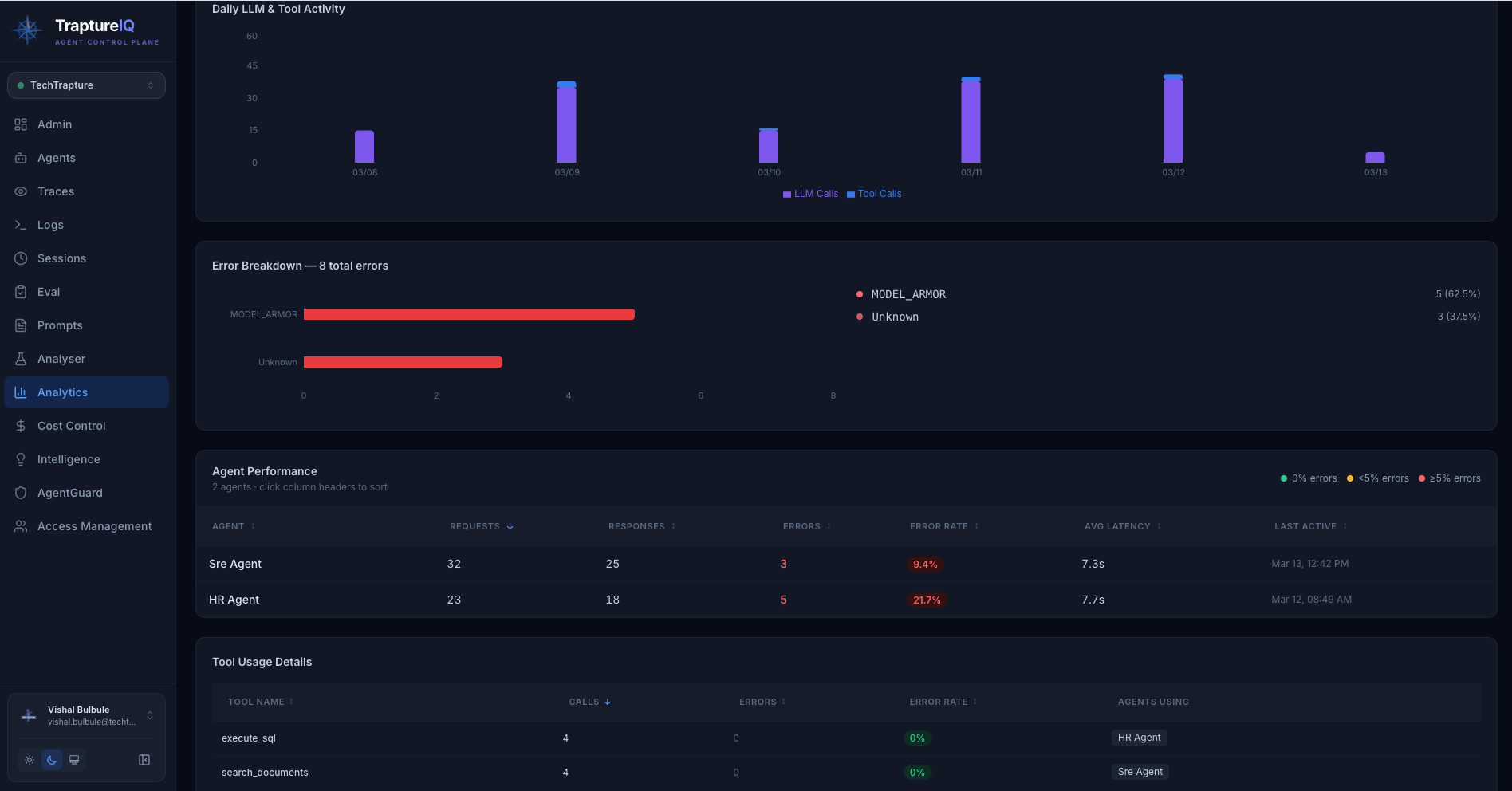
Daily LLM & Tool Activity (Grouped Bar Chart) Stacked bars showing LLM calls vs Tool calls per day. A rising ratio of LLM calls to tool calls may indicate agents are reasoning more rather than retrieving data.
Error Breakdown (Horizontal Bar Chart) Breaks down errors by type (e.g., Unknown, AgentGuard blocked, HTTP status codes) with percentage share. Quickly shows your dominant error category.
Agent Performance Table
Sortable table showing per-agent statistics — click any column header to sort.
| Column | What It Shows |
|---|---|
| Agent | Agent name |
| Requests | Total requests received |
| Responses | Successful responses |
| Errors | Failed requests (shown in red if > 0) |
| Error Rate | Errors as % — colour-coded: green = 0%, orange = <5%, red = ≥5% |
| Avg Latency | Mean response time |
| Last Active | Timestamp of the most recent request |
Tool Usage Details Table
Sortable table showing which tools agents called most, with reliability stats.
| Column | What It Shows |
|---|---|
| Tool Name | Name of the MCP tool or function |
| Calls | Total invocations |
| Errors | Failed calls |
| Error Rate | Reliability % for this tool |
| Agents Using | Which agents use this tool |
Common Use Cases
| Scenario | What to Do |
|---|---|
| "How are my agents performing overall?" | Check Row 1 stats — focus on Error Rate and Avg Latency |
| "Which agent gets the most traffic?" | See Top Agents panel or sort Agent Performance by Requests |
| "Why is my error rate high?" | Check the Error Breakdown chart for the dominant error type |
| "Which tools are failing?" | Sort the Tool Usage Details table by Error Rate descending |
| "How much LLM reasoning vs tool usage?" | Check the Daily LLM & Tool Activity chart — high LLM-to-tool ratio may mean over-reasoning |
| "Who are my most active users?" | See the Top Users panel |
Tips for Beginners
- Error Rate is your most important health signal — anything above 5% needs investigation.
- Sort the Agent Performance table by Error Rate to immediately find your most problematic agent.
- Cross-reference with Traces — when you spot a spike in errors or latency here, switch to Traces to find the specific failing requests.
- Tool Error Rate of 0% is normal — tool calls tend to be reliable; any errors there are worth investigating immediately.